Plans & Billing
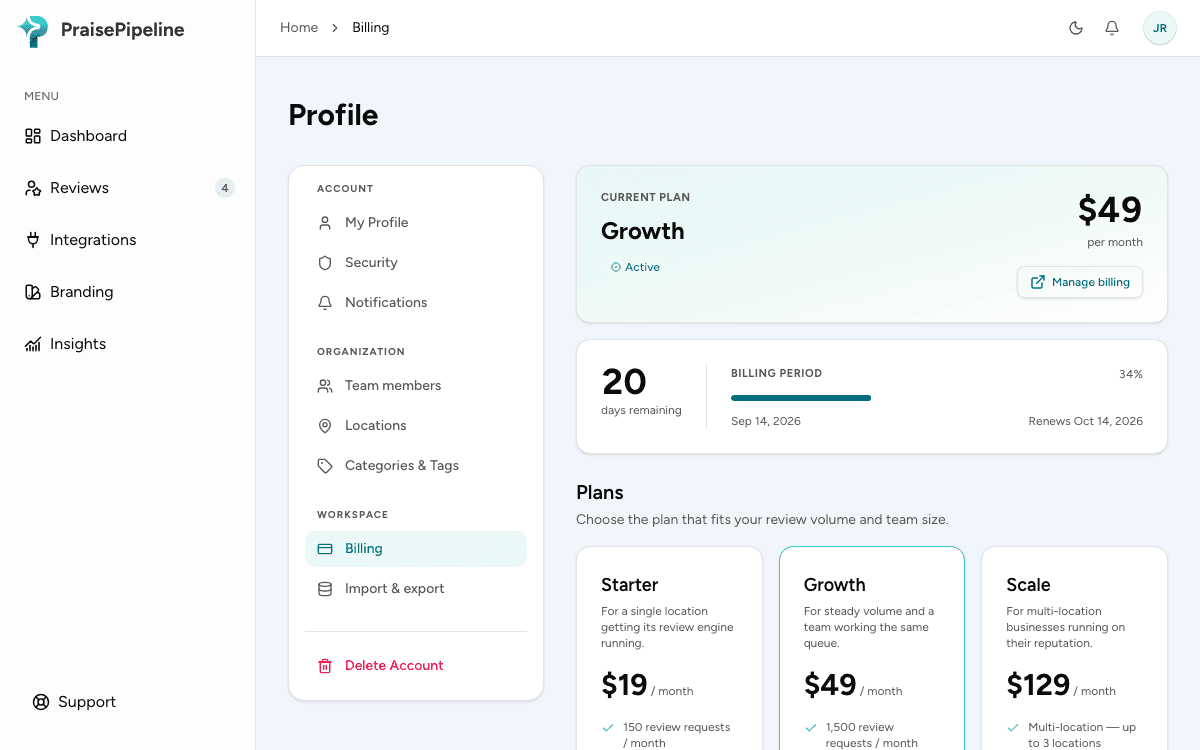
Everything about plans, your free trial, and managing your subscription. Billing lives under Profile → Billing in the dashboard.
Billing is admin-only. If you don’t see the Billing page, ask an organization admin.
Your free trial
Every new organization starts on a 14-day free trial — no card required. During the trial you can collect reviews, connect your tools, run the Google funnel, and embed the review showcase, with trial-level limits: 25 review requests, one connected tool, one location, and one user.
When the trial ends, pick a plan to keep going. If it lapses without a plan, your account pauses rather than disappears — see If your subscription lapses.
The plans
There are three plans. Current pricing is on the pricing page and on your in-app Billing page; here’s what each one unlocks:
| Starter | Growth | Scale | |
|---|---|---|---|
| Review requests / month | Up to 150 | Up to 1,500 | Unlimited |
| Integrations (connected tools) | 1 | Unlimited | Unlimited |
| Locations | 1 | 1 | Up to 3 |
| Team members | 1 | 5 | Unlimited |
| Google funnel, review showcase & moderation | ✓ | ✓ | ✓ |
| Insights & analytics | Preview | ✓ | ✓ |
| Review alerts & digests | — | ✓ | ✓ |
| Remove showcase branding | — | ✓ | ✓ |
| Custom webhook (API) integration | — | — | ✓ |
| Priority support | — | — | ✓ |
Running more than 3 locations? Talk to us about an enterprise plan.
Choosing or changing a plan
From Profile → Billing, choose a plan and check out — the payment step happens right in the app.
- Upgrading takes effect immediately: you’re charged the prorated difference for the rest of the current billing period right away. If that payment doesn’t go through, your plan stays as it was.
- Downgrading takes effect at the end of your current billing period, so you keep the features you’re paying for until then. A banner shows the pending change and its date.
- Changed your mind about a scheduled downgrade? Click Keep [your current plan] on the “Plan change scheduled” banner before the date, and the change is cancelled.
Choosing a plan during your free trial ends the trial: you’re billed right away, and the paid plan’s limits apply immediately. There’s one free trial per organization.
Managing payment, invoices & cancellation
The Manage billing button opens the secure billing portal, where you can:
- update your payment method,
- download past invoices,
- cancel your subscription.
Canceling schedules the end at your current period’s close — you keep access until then, shown by a banner with the date.
If your subscription lapses
If a trial ends without a plan, or a subscription is canceled or a payment ultimately fails, your account moves into a paused state rather than being deleted:
- Your data — reviews, tags, settings, team — is retained, and resubscribing restores full access.
- Product pages are locked behind a reactivation prompt, but billing stays reachable so you can resubscribe.
- Queued review requests are paused, not sent. Resubscribe within 30 days and they resume; after that they’re cleared.
- Your public review showcase disappears from your website (it takes up no space on the page) until you’re active again — there’s no need to remove the snippet.
A short payment problem (a card that needs updating) keeps full access during a grace period, with a “payment failed” banner — so a temporary hiccup won’t cut you off mid-cycle.
Questions
Anything billing-related we didn’t cover here? Get in touch.