Inviting Your Team
You don’t have to run PraisePipeline alone — invite teammates to help moderate reviews and manage your account.
Sending an invite
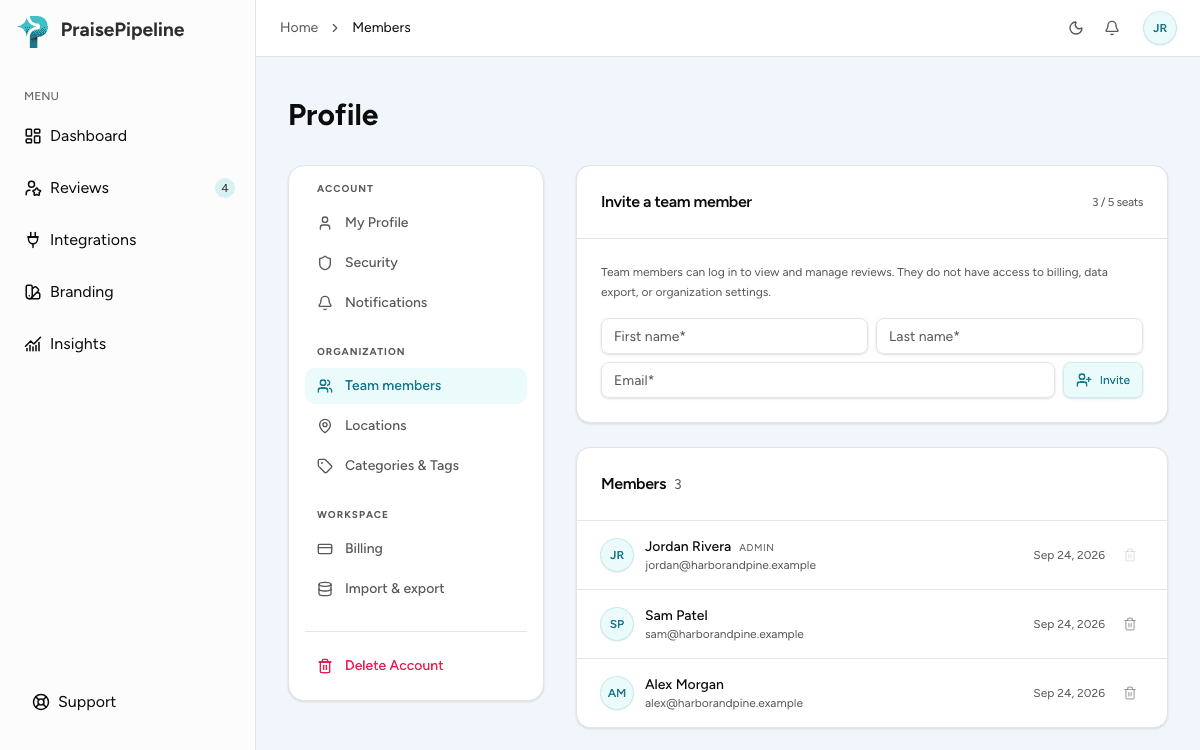
- Go to Profile → Team members in the dashboard (admins only).
- Enter your teammate’s email address and send the invite.
- They’ll receive an email with a link to join your organization. Until they accept, the invite shows as pending.
Removing a member
Members can be removed from the same Team members view. Removal takes effect immediately — they lose access to your organization’s dashboard, reviews, and settings.
A note on access
Everyone in your organization shares access to reviews, moderation, and analytics, and manages their own profile, security and personal notifications. Organization settings are admin-only:
- Branding — review request timing, the review showcase’s look, and the embed code
- Team members — inviting and removing (Profile → Team members)
- Locations and your Google Place ID (Profile → Locations)
- Editing tags (Profile → Categories & Tags — members can view them)
- Connecting/disconnecting integrations, including regenerating a webhook URL (Integrations)
- Organization notifications — the digests and rating-drop alert
- Billing (Profile → Billing)
- Data import & export (Profile → Import & export)
- Deleting the account
If a teammate can’t see one of these, it’s because they aren’t an admin. Granular roles and permissions are on the roadmap.
Last updated on