Insights & Analytics
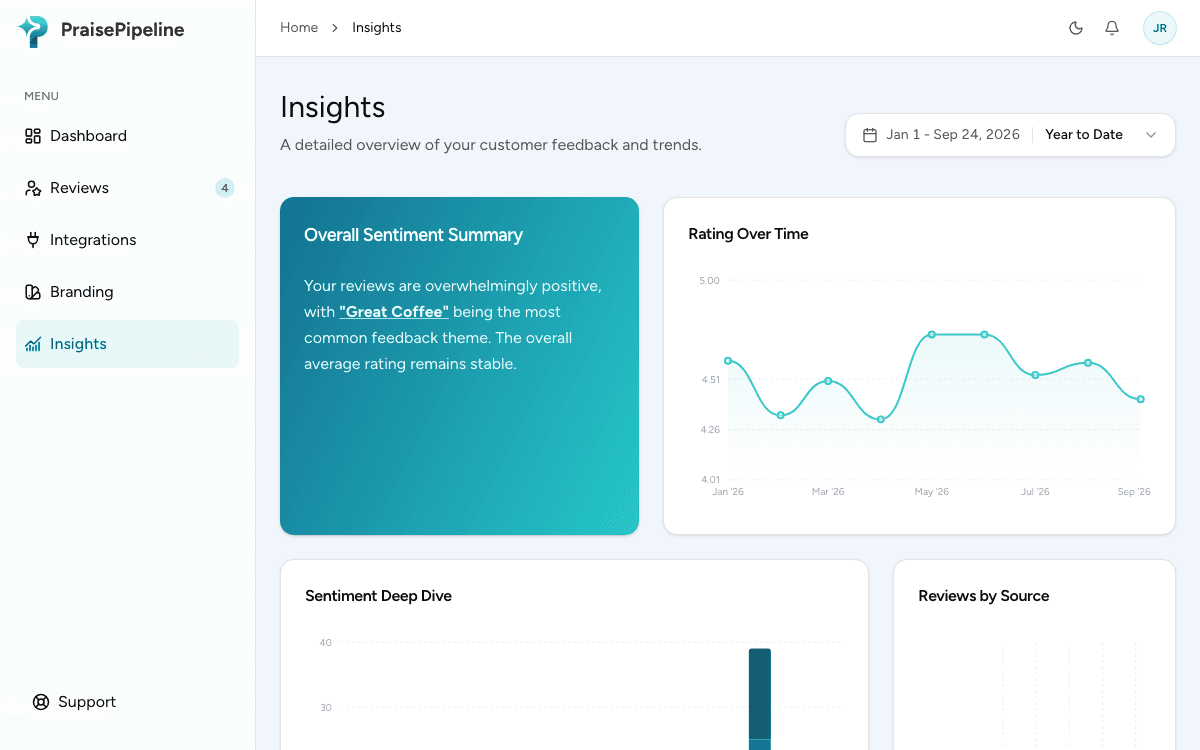
The Insights section of the dashboard turns individual reviews into trends you can act on.
What you can see
- Rating over time — how your average rating trends across the selected period (by day for shorter ranges, by month for longer ones), so a dip is visible while it’s still fixable.
- Sentiment breakdown — the balance of positive, neutral, and critical reviews across your history.
- What customers highlight — your tags ranked by how often customers pick them, split by sentiment. This is where tags pay off: “Customer Service” trending in critical reviews is a signal no star-average will show you.
- Reviews by source — which connected store or channel your reviews come from.
Reading it well
- The numbers and charts include all submitted reviews, not just approved ones — moderation choices never skew your data. The quoted customer feedback is the exception: it only quotes reviews you’ve approved, so nothing you rejected is put in front of your team as a highlight.
- Small volumes swing hard. A single 1-star review in a slow week can move the weekly average dramatically; trends over months are the honest signal.
Last updated on