Integrate Your Tools
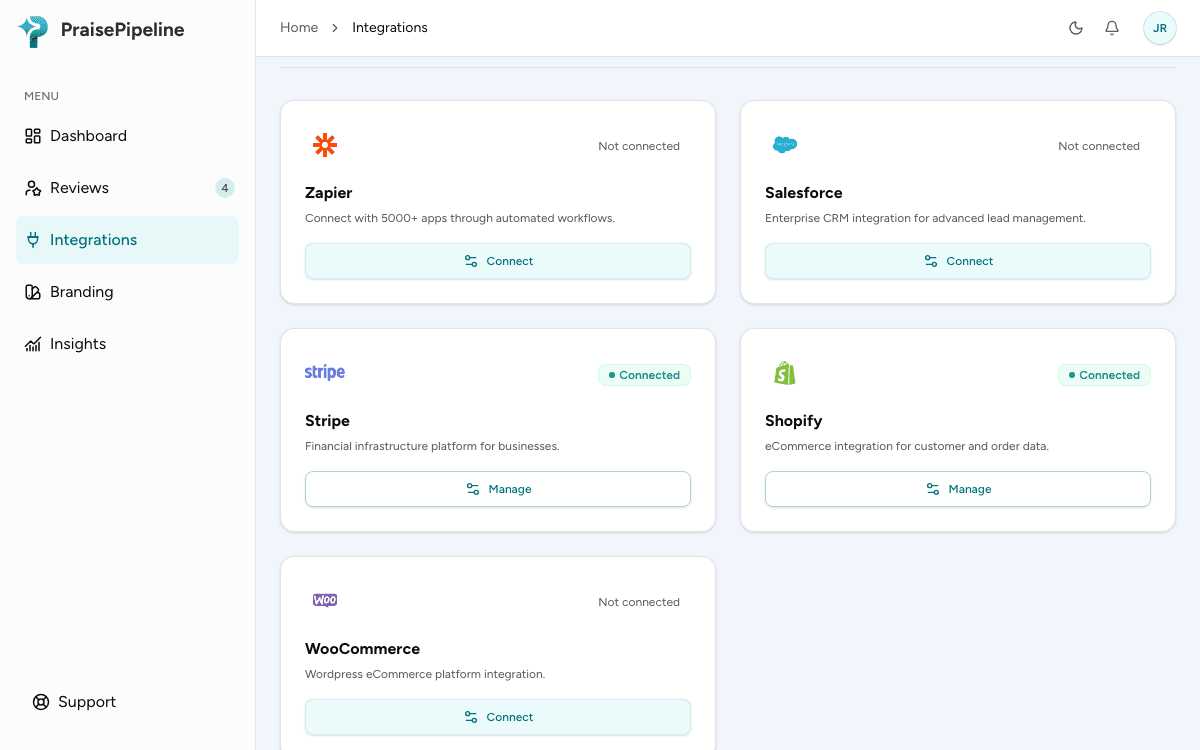
PraisePipeline learns about your sales through webhooks — small notifications your store, booking, or payment tool sends when a sale is recorded. Setup is the same shape everywhere: open Integrations, click Connect on the tool you use, copy the webhook URL it gives you, paste that into your tool’s webhook settings, and send a test if your tool offers one.
No email at checkout (a counter sale, a table, a job on site)? Use your review link or QR code instead. See Collecting reviews in person.
How many tools you can connect depends on your plan: one on Starter and during the free trial, unlimited on Growth and Scale (see Plans & Billing).
Each integration you connect gets its own webhook URL containing a private token. Treat it like a password — anyone with the URL can send sale events to your account. If a URL is ever exposed, or you stop using a tool, click Disconnect on that integration: its URL stops working immediately, and your other integrations keep running. Reconnecting later issues a fresh URL. If you run multiple locations, you choose which location an integration routes to when you connect it.
Stripe
- In Stripe, open Workbench → Webhooks and click Create an event destination.
- Choose Your account, and choose the Snapshot payload, not Thin. Thin events don’t include the customer’s details, so PraisePipeline turns them away.
- Select the
checkout.session.completedandcharge.succeededevents, choose Webhook endpoint, and paste the PraisePipeline webhook URL from the Stripe integration’s Connect panel. - Stripe has no test event for a live destination, so the card updates from Awaiting first event to Active when your next sale comes in.
Shopify
- In Shopify admin, go to Settings → Notifications → Webhooks and click Create webhook.
- Choose the Order payment event (
orders/paid) and the JSON format, paste your PraisePipeline URL, and save. (PraisePipeline can’t read XML.) - In the webhook’s ⋯ menu, click Send test. The card updates to Active, and Shopify’s sample order isn’t sent a review request.
WooCommerce
- In WordPress admin, go to WooCommerce → Settings → Advanced → Webhooks.
- Add a webhook with status Active, topic Order updated, and your PraisePipeline URL as the delivery URL.
- Saving it sends WooCommerce’s ping, and the card updates to Active.
PraisePipeline asks only once an order is Processing or Completed, so customers whose payment failed or hasn’t arrived aren’t asked. It also skips orders paid more than 7 days earlier, so adding a note to an old order, or bulk-completing old orders, never asks those customers again. Order updated (rather than Order created) also catches orders that are paid later, such as bank transfers.
Zapier
Use Zapier for tools PraisePipeline doesn’t connect to directly, such as Square, QuickBooks, Jobber, Housecall Pro or Calendly. The PraisePipeline app works on Zapier’s free plan. The one exception is a trigger app that Zapier labels premium, which needs a paid Zapier plan (see below).
- Add the PraisePipeline app to your Zapier account: Add PraisePipeline to Zapier .
- In PraisePipeline, open Integrations, click Connect on Zapier, and copy the connection URL.
- In Zapier, create a Zap whose trigger is the moment a customer should be asked: a payment in Square, a paid invoice in QuickBooks, a closed job in Jobber.
- Add PraisePipeline → Send Review Request as the action. When Zapier asks you to connect PraisePipeline, paste the connection URL.
- Map Customer Email (required) and Customer Name, then test the step. The Zapier card on Integrations updates to Active.
Step-by-step Zaps for Square, QuickBooks, Jobber and Housecall Pro are in Zapier Guides.
When PraisePipeline doesn’t send a request for an event, the step halts with the reason instead of failing. That happens when the event has no customer email, when the customer was asked recently, or when they already have a request waiting. A halted step doesn’t use a Zapier task or pause your Zap. The cooldown and queue rules are PraisePipeline’s usual guardrails. A missing email usually means the wrong field is mapped, so PraisePipeline also flags it on Integrations.
A few trigger apps are premium on Zapier and need a paid Zapier plan; Zapier labels them when you pick a trigger. On a paid plan you can also skip the app and use Webhooks by Zapier → POST to the connection URL, sending customer_email (required) and customer_name in the body.
Salesforce
- In Salesforce Setup, create a record-triggered Flow that runs when a deal closes (for example, an opportunity moves to Closed Won), and add an asynchronous path. Salesforce doesn’t allow a callout while the record is saving.
- On that path, add an HTTP Callout action. Its Named Credential’s URL is
https://app.praisepipeline.com, and the rest of your PraisePipeline URL (/api/webhooks/ingest/…) is the action’s path. The private token in that path is the only credential needed. - Send a
POSTwith a JSON body holding the contact’s email asContactEmailand their name asContactName. For the sample response, use{"success": true, "message": "Scheduled"}. PraisePipeline always answers in that shape, including when it skips a contact.
Salesforce Outbound Messages aren’t supported. They send XML, and PraisePipeline expects JSON. Building the Flow uses Salesforce’s admin tools, so it’s best done by whoever manages your Salesforce org.
Anything else (generic webhook)
Any system that can send an HTTP POST works. The Custom Webhook (API) integration is part of the Scale plan — on other plans it isn’t listed, so use Zapier as the bridge instead. Connect it to get its URL, then POST JSON to it with at least a customer_email field (plus customer_name if you have it).
Each connection routes to a single location. If you run multiple locations, connect the Custom integration once per location and send each location’s orders to that location’s URL — the location is fixed by the URL, not the payload.
Securing your webhook (optional, recommended)
Your webhook URL already contains a private token, so keep it secret. For Stripe, Shopify, and WooCommerce you can add an extra layer: a signing secret. Each of those providers issues one when you create the webhook — copy it, then in that integration’s panel choose Add a signing secret and paste it in. PraisePipeline then verifies every event’s cryptographic signature, so even a leaked URL can’t be used to send you fake sales. Leave it blank to authenticate by the URL token alone. (Zapier, Salesforce, and custom webhooks have no standard signature, so this option isn’t shown for them.)
If a URL is ever exposed, you can also Regenerate URL on the connection to issue a new one (the old one stops working immediately).
After connecting
Every paid order now schedules a review request automatically — see How review requests work for the timing and guardrails.
If a connected tool sends sales without a customer email, no request can go out for them. PraisePipeline shows a warning on that integration (Integrations), with how many such events arrived and when, and sends a notification at most once a week. The count is of events, so one order that sends several updates can count more than once. Common causes are point-of-sale orders, checkouts that don’t require an email, or, in a Zap, the wrong field mapped to Customer Email. Click Dismiss once you’ve fixed it or decided it’s expected.