Notifications
Stay on top of reviews without living in the dashboard.
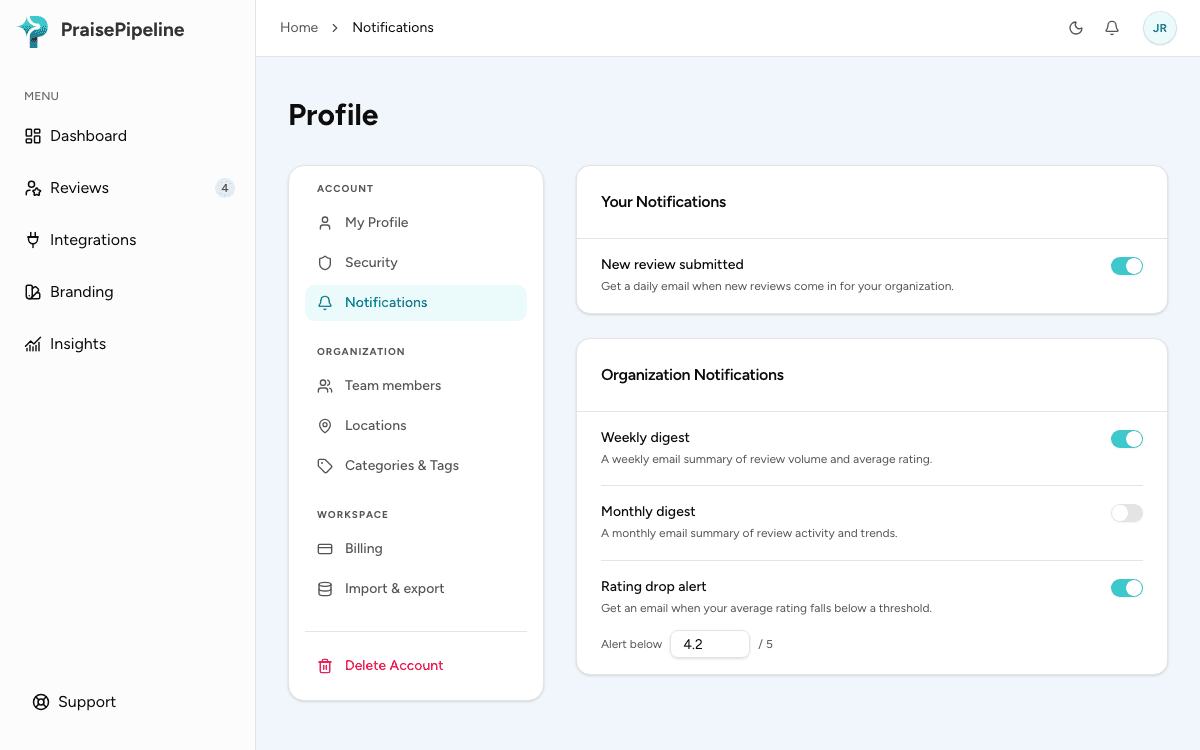
All notification settings live under Profile → Notifications.
Your notifications (everyone)
- New review submitted — a daily email when new reviews have come in for your organization. Each team member turns this on or off for themselves.
Organization notifications (admins, Growth and Scale)
These are set once for the whole organization by an admin, and are included on the Growth and Scale plans (see Plans & Billing):
- Weekly digest — a weekly email with how many reviews came in over the last 7 days and their average rating.
- Monthly digest — the same summary for the last 30 days, with a link to the trends in Insights.
- Rating drop alert — an email when your average rating falls below a threshold you set (anywhere from 1 to 5), so a slide shows up in your inbox instead of going unnoticed.
Account emails (admins)
Some emails aren’t settings: admins always get them, because they need action. One of them is the review request limit email: if your plan’s monthly limit is reached, new sales stop getting review requests until the next billing period, and we email your admins once that period to say so (more). Billing emails, such as a failed payment, work the same way.
In the dashboard
New reviews also appear in the dashboard’s notification feed (the bell) as they arrive. Imported reviews don’t trigger one.
Last updated on