The Review Request Email
This is the one thing every customer sees — the short email that invites them to leave a review. It’s sent for you automatically; there’s nothing to write or design.
What your customer receives
- From: your company name (e.g. Joe’s Plumbing), so it’s recognizable in a crowded inbox. The sending address is
[email protected]— we handle delivery on your behalf. - Subject: “Quick question about your experience with [your company]” — low-key and personal, not a marketing blast.
- Body: a friendly one-line ask and a single button that opens your review page. No login, no long form.
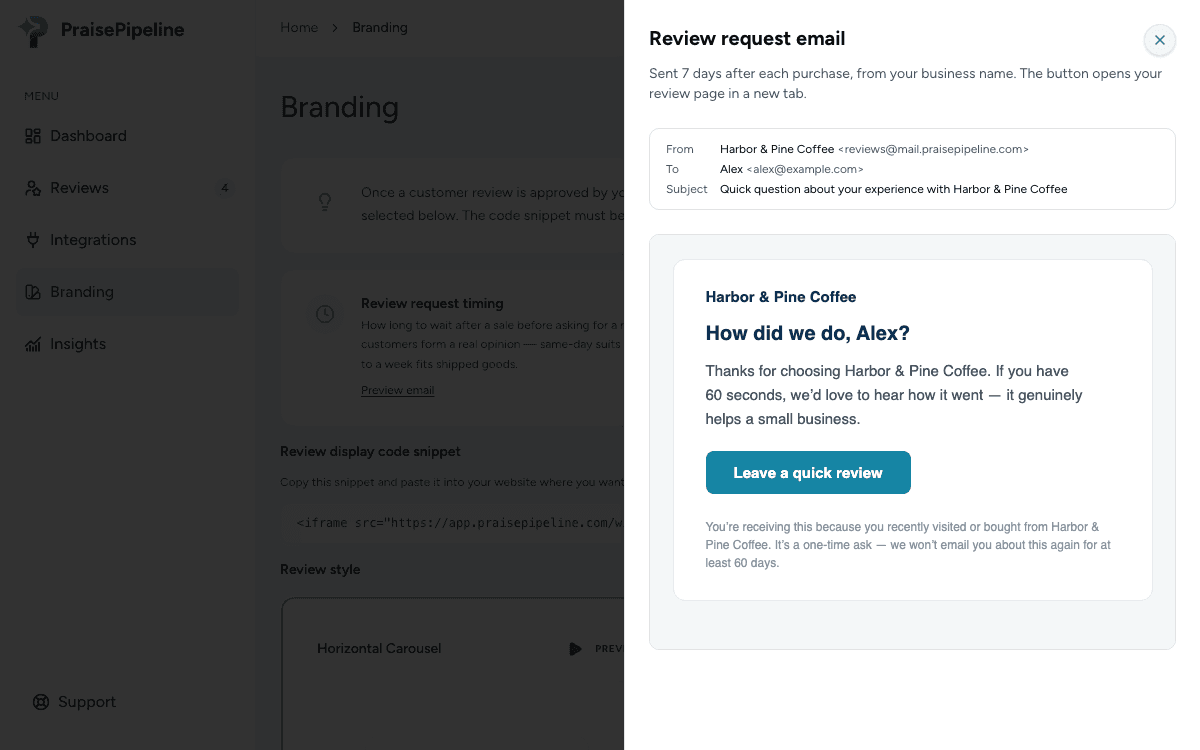
The whole thing is designed to feel like a real person following up, because a well-timed note after the sale gets far better response than a mass “rate us” campaign.
When it goes out
After the wait you set on your Branding page (7 days by default), once — subject to the 60-day cooldown so repeat customers aren’t pestered. The full timing and guardrails are in How review requests work.
Deliverability
Review requests are ordinary transactional email and land in the inbox for the vast majority of recipients. If a customer says they didn’t get one:
- Ask them to check spam/junk and search for your company name.
- Confirm the email address on the sale is correct.
- Check that it isn’t simply the review wait or 60-day cooldown — the most common explanation of all.
What you can’t change (yet)
The sender name (your company) and subject are fixed for now — they’re tuned for response rates and deliverability. The timing is configurable on your Branding page. Custom copy and sending from your own domain are on the roadmap.